MAONO P1 USB Audio Interface Review: Specs, Pros and Cons
As an Amazon Associate we earn from qualifying purchases. Links on this page are affiliate links.
This maono p1 USB audio interface review covers the MAONO P1, a compact unit designed for creators who need flexible connectivity and clean signal capture. It features dual USB ports with MFi-certified support for simultaneous computer and mobile connection. The interface offers up to 70dB of gain, allowing it to drive dynamic microphones without external boosters. It records at 24-bit/192kHz quality with a -130dB EIN for low noise. This setup targets podcasters and musicians seeking a streamlined workflow for streaming and recording.
What stands out
- Dual USB ports with MFi-certified connectivity for simultaneous PC and mobile use.
- Up to 70dB gain drives dynamic microphones without needing external boosters.
- 24-bit/192kHz recording resolution with -130dB EIN for silent background noise.
- Auto-Gain feature sets ideal microphone levels for clear voice capture in OBS Studio.
- Zinc-alloy metal housing provides durability in a compact 5.98 x 3.46 x 5.9 inch footprint.
Who it fits
Good fit for
This interface suits podcasters, streamers, and musicians who record on the go. If you use dynamic microphones or electric guitars, the 70dB gain handles them well. The MFi certification makes it ideal for iPhone or iPad users who want to record in GarageBand or Logic Pro. Creators needing low-latency monitoring via ASIO support will also find this useful. It fits well in home studios or mobile setups where desk space is limited.
Who should skip it
You should look elsewhere if you require a traditional mixer with multiple XLR inputs for live band setups. The P1 is a single-input interface focused on solo creators. If you need extensive hardware controls for complex routing, the software-based routing in ProStudio2 may feel limiting. Users seeking a built-in display for real-time level visualization will not find one here, relying instead on LED indicators. It is not designed for multi-channel live performance recording.
Verdict: The MAONO P1 offers solid gain and versatile connectivity for solo creators. It delivers clean audio for podcasting and music production in a durable, compact package.
Key specs explained for MAONO P1
70dB Gain
This gain level allows you to drive dynamic microphones without needing an external booster. You can capture clear vocals and guitar nuances directly. This spec matters if you use lower-output mics. When comparing DJ controllers, look for built-in preamps with similar gain ranges to ensure your microphones or instruments sound full without extra hardware cluttering your setup.
24-bit/192kHz
This resolution captures detailed audio data for studio-grade quality. You get precise recording of every vocal or instrument nuance. High sample rates are useful for professional music production. When shopping for DJ controllers, check if they support high-resolution audio input to ensure your live performances or recordings maintain clarity and depth without compression artifacts.
-130dB EIN
Equivalent Input Noise this low ensures dead-silent recording backgrounds. You avoid unwanted hiss during quiet passages or between phrases. This spec is critical for home studio environments. Compare this against DJ controllers to find units with low noise floors, ensuring your mixes and live sets remain clean and professional without distracting background noise.
Dual USB ports
You can connect your computer and phone or iPad simultaneously. This hybrid connectivity supports MFi-certified devices for seamless workflow. You record on one device and stream from another. When evaluating DJ controllers, prioritize models with multiple connection options to allow flexible routing of audio sources and mobile devices for live performance or content creation.
Design and build quality
The MAONO P1 features a rugged zinc-alloy metal housing. According to the listing, this material choice delivers studio-grade durability while maintaining a sleek aesthetic. You get a solid, premium feel that resists wear during frequent transport or daily desk use. The compact footprint measures 5.98 inches in width, 3.46 inches in height, and 5.9 inches in length. This small size fits easily on crowded home studio desks or mobile streaming setups without taking up valuable space.
The unit includes an ergonomic 15-degree tilt angle. This design keeps physical controls within easy reach while you are recording or mixing. You can adjust levels without leaning over or straining your neck during long sessions. The layout is straightforward, prioritizing essential functions for creators who need quick access to mute and gain controls.
Finish options are limited to the metal construction described. There are no plastic covers or soft-touch coatings mentioned. This means the device is built for function over fancy textures. You get a durable interface that handles the rigors of content creation. The design supports both stationary home recording and on-the-go mobile streaming. It is a practical tool for podcasters and musicians who need reliable hardware that fits their workflow.
Setup and everyday use
Setup begins with the included USB-C to USB-A or USB-C cable. You connect the interface to your computer, phone, or iPad. The dual USB ports allow simultaneous connection to a computer and a mobile device. This means you can record in GarageBand or Logic Pro while streaming directly from your phone. The MFi certification ensures stable connectivity with Apple devices. You also connect microphones, guitars, and headphones to the appropriate inputs. The ergonomic 15-degree tilt angle positions controls within easy reach. This design simplifies access to knobs and buttons during sessions.
Daily use relies on the software integration with ProStudio2. This application helps route audio from various sources like FL Studio, Spotify, or browser tabs to dedicated channels. You can add VST effects for vocal processing and real-time noise reduction. The built-in loopback feature captures instrument, voice, and desktop audio in one workflow. For live monitoring, direct monitoring delivers low-latency audio. You hear your input without distracting delays. Independent headphone and monitor controls let you adjust listening levels separately. Auto-Gain settings in OBS Studio eliminate manual gain adjustments for clear voice capture. Independent mute controls prevent unwanted noise during instrument changes. Dynamic LED indicators provide visual feedback to prevent clipping. The compact dimensions of 5.98 by 3.46 by 5.9 inches fit easily on most desks. This setup supports podcasting, streaming, and music production without complex routing.
Check Compatibility Before You Buy
Before you buy this MAONO P1 USB Audio Interface, verify your device compatibility. The listing notes MFi-certified support for iPhone and iPad, but you should confirm your specific Android phone or camera models work with the dual USB setup. You need to check if your computer supports ASIO drivers for low-latency monitoring, as this is crucial for music production. Since the unit connects via USB, ensure you have enough ports available on your PC or laptop. You may also need a separate power source if your computer’s USB port cannot supply enough power, though the data does not specify external power requirements. Keep the unit clean and dry to maintain the zinc-alloy housing. This interface fits alongside other DJ controllers and audio gear by offering studio-grade 24-bit/192kHz quality. It is ideal if you need hybrid connectivity for streaming or podcasting alongside your main DJ setup. Unlike many DJ controllers, it lacks built-in speakers, so you will need headphones or external monitors for playback. Consider if your workflow requires direct monitoring without software latency. This unit suits creators who record vocals or guitar while managing digital streams. It is not a standalone DJ controller but a complementary tool for audio capture and routing.
Check before you buy
- Verify your phone or tablet supports MFi-certified USB connections.
- Confirm your computer supports ASIO drivers for low latency.
- Check if your USB ports provide sufficient power.
- Ensure you have compatible headphones for direct monitoring.
The product at a glance
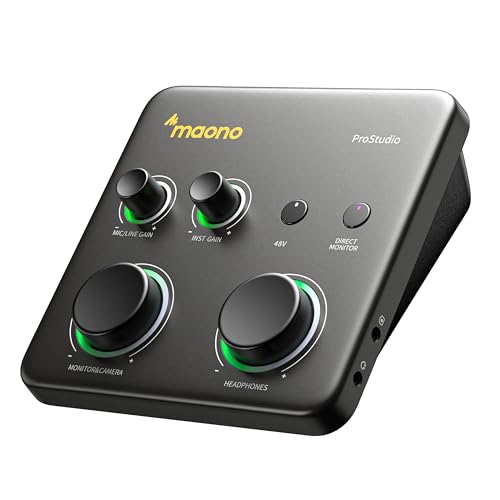
MAONO P1 USB Audio Interface
Best for: Hybrid recording on PC and mobile devices
- Connectivity
- USB Audio Interface, USB
- Intended Use
- Recording, Streaming
- Dimensions
- 5.9 × 5.98 × 3.46 inches
View on Amazon: MAONO P1 USB Audio Interface Affiliate link
The MAONO P1 is a compact USB audio interface designed for creators who need hybrid connectivity. It offers up to 70dB gain to drive dynamic microphones without external boosters. The unit supports 24-bit/192kHz recording with a -130dB EIN for low noise. It connects to PCs, phones, and iPads via dual USB ports. This interface suits podcasters and musicians who want direct monitoring and streamlined routing through ProStudio2 software.
Pros
- Dual USB ports enable simultaneous connection to computer and mobile device.
- 70dB gain handles dynamic microphones without needing an external booster.
- 24-bit/192kHz resolution ensures high-fidelity audio capture.
- Auto-Gain feature simplifies microphone level adjustment in streaming software.
- Zinc-alloy housing provides a durable and compact build.
Cons
- No dedicated physical display screen for visual feedback.
- Software integration relies on third-party apps like ProStudio2.
- Limited to USB connectivity without built-in wireless options.
Good fit if
- You record vocals or guitar on both PC and mobile devices.
- You need high gain for dynamic microphones without extra hardware.
- You stream content and want simplified gain control.
Skip if
- You require a built-in display for real-time level monitoring.
- You need native Bluetooth connectivity for wireless streaming.
- You prefer a standalone unit without software dependency.
Verdict: The MAONO P1 USB Audio Interface fits creators who need hybrid USB connectivity and high gain for dynamic mics. It is a practical tool for podcasters and musicians recording on multiple devices.
Specifications side by side
| Spec | MAONO P1 USB Audio Interface |
|---|---|
| Connectivity | USB Audio Interface, USB |
| Intended Use | Recording, Streaming |
| Dimensions | 5.9 × 5.98 × 3.46 inches |
| Model | P1 |
Frequently asked questions
What are the physical dimensions of the MAONO P1 USB audio interface?
The MAONO P1 measures 5.98 inches in width, 3.46 inches in height, and 5.9 inches in length. These compact dimensions make it easy to fit on small desks or portable setups. You can place it next to your laptop or mobile device without taking up excessive space. The small footprint is ideal for creators with limited studio room.
Does the MAONO P1 support USB connectivity for both computers and mobile devices?
Yes, the MAONO P1 features dual USB ports designed for hybrid recording. It allows you to connect to a computer while simultaneously linking to a mobile device. This setup supports MFi-certified iPhones and iPads. You can record vocals or instruments on multiple platforms at the same time without needing extra adapters.
Who is the MAONO P1 best suited for based on its specifications?
This interface is best for hybrid recording on PC and mobile devices. It fits creators who need flexible connectivity and high gain for dynamic microphones. Podcasters and musicians who switch between desktop software and mobile apps will find it practical. It serves as a central hub for recording across different operating systems.
What is the model number for this MAONO USB audio interface?
The model number for this unit is P1. It is part of the MAONO product line designed for USB audio interfacing. You can identify it by the P1 label on the device or in the product specifications. This model is distinct from other interfaces in the brand's catalog.
How wide is the MAONO P1 audio interface?
The MAONO P1 is 5.98 inches wide. This width provides a stable base for your audio connections. It is slightly wider than it is tall, ensuring the unit sits securely on your desk. This measurement helps you plan your desk layout and cable management around the device.
What is the height of the MAONO P1 USB audio interface?
The device stands 3.46 inches tall. This low profile keeps it from blocking your view of other equipment. It allows you to place cables underneath or behind the unit easily. The height is designed to fit comfortably in tight spaces while maintaining a sturdy presence.
How long is the MAONO P1 audio interface?
The MAONO P1 is 5.9 inches long. This length accommodates the necessary ports and internal components without extending too far. It aligns well with standard desk depths. You can position it parallel to your keyboard or perpendicular to your screen depending on your workflow.