What Is Connectivity? A Guide for DJ Controllers Buyers (2026)
As an Amazon Associate we earn from qualifying purchases. Links on this page are affiliate links.
Connectivity Explained for DJ Gear
When you evaluate DJ controllers, connectivity explained is the first step to understanding how your gear talks to your computer and software. This spec covers the physical ports and wireless protocols that link your hardware to your digital setup. You need to know which connections are available to ensure your workflow runs smoothly without lag or compatibility issues.
The most common standard is USB. This cable connects your controller directly to your laptop or desktop. It handles both power and data transfer. You will see listings specify USB version, such as USB-C or USB 2.0. USB-C is now the norm for modern devices because it supports faster data speeds and reversible plugs. This ensures stable communication between your controller and your DJ software.
Bluetooth is another key feature. It allows wireless control over certain functions. You might use it to stream audio from your phone to the controller or to pair with wireless headphones. Not all controllers include this. Check the specifications to see if Bluetooth is present for audio or just for control signals. This adds flexibility to your setup, especially for mobile DJs.
Some units offer a USB audio interface function. This lets the controller act as a sound card. You can route audio directly from your computer to the controller’s outputs. This bypasses your computer’s internal sound card, reducing latency and improving audio quality. This is essential for professional setups where clear sound is critical.
Digital Vinyl System (DVS) support is a specialized connection. It requires specific USB inputs to link turntables or CDJs to your software. This lets you control digital files using analog media. If you mix vinyl or want tactile control, this spec is vital. Always verify the port type and protocol. Understanding these details helps you choose gear that fits your specific needs.
Connectivity Options Compared
Bluetooth
Bluetooth connectivity allows wireless transmission of audio and control data. This feature supports direct connection to smartphones and tablets, removing the need for cables. You gain significant portability and setup speed. The Hercules DJControl Mix Bluetooth Controller uses this method for mobile DJs. It suits users who mix on phones or tablets. The trade-off is potential latency or lower audio fidelity compared to wired connections. You must ensure your device supports the required Bluetooth profiles. This option is ideal for casual or mobile setups where convenience outweighs absolute technical precision.
USB Audio Interface
A USB audio interface allows the controller to process sound internally without relying on your computer’s sound card. This reduces latency and improves audio quality. The Hercules Inpulse 500 includes this feature alongside Bluetooth and standard USB. It suits DJs who need reliable, high-fidelity sound directly from the unit. You do not need to route audio through your computer’s internal hardware. This setup provides cleaner output and more stable performance during live sets. It is a practical choice for serious performers who prioritize audio integrity and reduced system dependency.
DVS
Digital Vinyl System (DVS) compatibility lets you control digital files using traditional vinyl records or timecode CDs. This feature bridges analog workflow with digital libraries. It suits DJs who prefer tactile control and familiar vinyl techniques. You can scratch, cue, and manipulate tracks with physical platters. This option requires specific software support and timecode media. It is essential for traditionalists or those who mix vinyl in digital environments. The feature offers a hybrid experience, combining the feel of records with the flexibility of digital files. It is a specialized tool for specific mixing styles.
USB
Standard USB connectivity provides a wired link to your computer for data and audio. This is the most common connection type for DJ controllers. It offers stable, low-latency communication and reliable power delivery. The AlphaTheta FLX2 and Hercules Inpulse 200 use this method. It suits beginners and professionals who prioritize stability and broad software compatibility. You need a USB cable and port on your computer. This option is versatile and widely supported. It is the baseline for most digital DJ setups, ensuring your controller works with major software platforms without complex configuration.
Who Needs This Connectivity Spec
Who needs it
You should prioritize this guide if you plan to use Digital Vinyl System (DVS) for scratch mixing. This feature requires a stable USB connection to send control signals from your turntables or timecode media to your software. If you rely on USB Audio Interface capabilities, this spec ensures your controller acts as a high-quality sound card, routing audio directly to your computer without external hardware. Bluetooth support is essential if you frequently mix on mobile devices like tablets or phones. It allows wireless transmission of audio and control data, which significantly improves portability. You gain setup speed and remove cable clutter. This combination of specs is ideal for performers who need both precise control via USB and the flexibility of wireless connections for mobile sets or quick transitions between different types of media.
Who can skip it
You can ignore these specific connectivity options if you only use standard line-out connections to a mixer or external speakers. Many DJs prefer analog outputs for latency reasons or because their existing setup already includes a dedicated audio interface. If you do not scratch or manipulate timecode vinyl, DVS support is unnecessary complexity. Similarly, if you never mix on mobile devices, Bluetooth adds cost without utility. In these cases, prioritize build quality, pad responsiveness, and software compatibility instead. Focus on controllers that offer robust USB data transfer for basic track loading and mixing. You do not need wireless audio transmission if your environment is controlled and cabled. Skip the extra features that complicate your signal chain. Stick to the core functions that deliver reliable audio and control without requiring additional wireless protocols or specialized DVS hardware integration.
Connectivity Glossary
USB Type-C
A reversible connector offering faster data transfer and power delivery. It is common on modern controllers for reliable computer linking.
USB 3.0
A high-speed data interface standard. It ensures low latency audio streaming and stable communication between your controller and software.
Bluetooth LE
Low Energy Bluetooth for wireless control signals. It pairs with mobile devices to enable portable mixing without physical cables.
MIDI Over USB
A protocol sending control data like fader movements via USB. It allows the computer to interpret your physical inputs instantly.
Audio Interface
Built-in hardware that converts digital signals to analog sound. It routes output directly to speakers or headphones without external gear.
Clock Sync
The process of aligning timecode signals from external decks. It keeps your software tempo locked with turntables or CDJs for mixing.
Host Port
The specific USB slot for connecting to your computer. Using the wrong port may prevent software recognition or data transfer.
Wireless Latency
The delay between pressing a button and hearing the response. Lower latency is critical for precise scratching and beatmatching.
Quick picks
| # | Product | Best for | Price |
|---|---|---|---|
| 1 | Hercules DJControl Mix Bluetooth Controller | mobile DJs using smartphones | Check price of Hercules DJControl Mix Bluetooth Controller on Amazon |
| 2 | Hercules Inpulse 500 with Bluetooth Monitors | Portable DJs wanting a complete bundle | Check price of Hercules Inpulse 500 with Bluetooth Monitors on Amazon |
| 3 | AlphaTheta FLX2 2-Channel DJ Controller | beginners seeking portability and auto-beatmatching | Check price of AlphaTheta FLX2 2-Channel DJ Controller on Amazon |
| 4 | Hercules DJControl Inpulse 200 USB Controller | beginners learning basic USB two-track mixing | Check price of Hercules DJControl Inpulse 200 USB Controller on Amazon |
| 5 | Arturia 88-Key Weighted USB Controller | Studio producers needing a full-size MIDI keyboard | Check price of Arturia 88-Key Weighted USB Controller on Amazon |
| 6 | Reloop Neon Modular Serato Pad Controller | Serato users needing 4-deck sample control | Check price of Reloop Neon Modular Serato Pad Controller on Amazon |
Our 6 picks
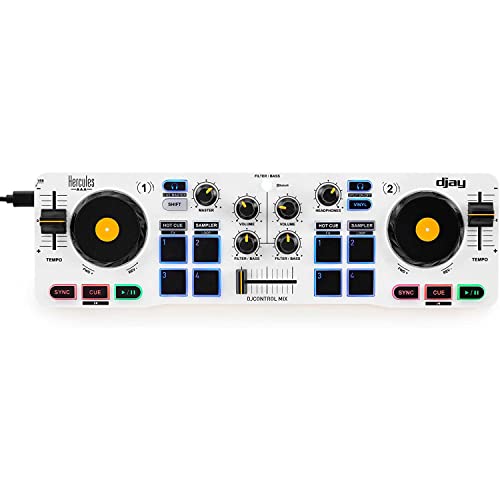
Hercules DJControl Mix Bluetooth Controller
Best for: mobile DJs using smartphones
- Connectivity
- Bluetooth (what this guide is about)
- Compatible Software
- djay app by Algoriddim
- Deck Control
- 2 decks
- Dimensions
- 1.7 × 16.3 × 3.94 inches
- Weight
- 2.1 pounds
View on Amazon: Hercules DJControl Mix Bluetooth Controller Affiliate link
The Hercules DJControl Mix is a compact, foldable DJ controller designed for mobile use. It connects via Bluetooth to iOS and Android devices, running the included dJay app by Algoriddim. The unit features two decks with jog wheels, faders, knobs, and pads. It weighs 2.1 pounds and measures 16.3 inches wide. This setup suits beginners who want a portable solution for practicing or performing on smartphones.
Pros
- Bluetooth wireless connectivity for iOS and Android
- Includes dJay app by Algoriddim
- Foldable design with included smartphone stand
- Standard controller layout with jog wheels and faders
Cons
- Requires a smartphone or tablet rather than a computer
- Limited to two decks
- No USB audio interface capability for desktop software
Good fit if
- You need a portable controller for mobile devices
- You want to use the dJay app for mixing
- You prefer a lightweight, foldable build for travel
Skip if
- You require a wired USB connection to a computer
- You need to use desktop DJ software like Serato or Rekordbox
- You want to control more than two decks simultaneously
Verdict: Hercules DJControl Mix Bluetooth Controller is a practical option for mobile DJs who prioritize portability and app-based mixing over traditional computer connectivity.

Hercules Inpulse 500 with Bluetooth Monitors
Best for: Portable DJs wanting a complete bundle
- Connectivity
- Bluetooth, USB Audio Interface, USB (what this guide is about)
- Channels
- 2-channel
- Compatible Software
- DJUCED, Serato DJ Lite
- Performance Pads
- 16 RGB-backlit performance pads
- Jog Wheels
- High-resolution, touch-sensing rings
- Audio Interface
- Built-in audio interface
View on Amazon: Hercules Inpulse 500 with Bluetooth Monitors Affiliate link
This 2-channel controller features high-resolution jog wheels with touch-sensing rings and a built-in audio interface. It connects via USB and Bluetooth. The bundle includes Eris 3.5BT studio monitors for wireless monitoring. You get 16 RGB pads and an input mixer with EQ controls. It suits DJs who want a complete, portable setup with integrated sound card capabilities.
Pros
- High-resolution jog wheels with touch-sensing rings
- Built-in audio interface and hardware input mixer
- Bluetooth connectivity for wireless monitoring
- 16 RGB-backlit performance pads
- Bundle includes Eris 3.5BT studio monitors
Cons
- Requires USB power connection
- No dedicated display screen
- Software integration limited to DJUCED and Serato DJ Lite
Good fit if
- You want a complete bundle with monitors included
- You need wireless monitoring via Bluetooth
- You prefer touch-sensing jog wheels
Skip if
- You require a dedicated display screen
- You need a remote control
- You want a standalone unit without monitors
Verdict: Hercules Inpulse 500 with Eris 3.5BT is a practical choice for DJs who want a complete, portable setup with wireless monitoring and touch-sensing jog wheels.

AlphaTheta FLX2 2-Channel DJ Controller
Best for: beginners seeking portability and auto-beatmatching
- Connectivity
- USB (what this guide is about)
- Channels
- 2-channel
- Compatible Software
- rekordbox, djay
- Intended Use
- Streaming
- Dimensions
- 8.19 × 15.1 × 1.9 inches
- Weight
- 2.65 pounds
View on Amazon: AlphaTheta FLX2 2-Channel DJ Controller Affiliate link
The AlphaTheta DDJ-FLX2 is a 2-channel USB DJ controller designed for beginners. It features a Smart Fader that automatically matches volume, BPM, and bass. The unit connects via USB-C and draws bus power from your device. It supports rekordbox and djay software. This compact controller weighs 2.65 pounds and measures 15.1 inches wide. It suits those starting their DJ journey with minimal gear.
Pros
- Smart Fader handles beatmatching automatically
- USB-C bus power for portability
- Compatible with rekordbox and djay
- Lightweight 2.65 pound build
Cons
- No Bluetooth wireless connectivity
- No built-in audio interface for external speakers
- No DVS support
Good fit if
- You want a lightweight, portable setup
- You need automatic beatmatching assistance
- You use rekordbox or djay
Skip if
- You require Bluetooth wireless connection
- You need DVS functionality
- You want a built-in audio interface
Verdict: AlphaTheta DDJ-FLX2 Compact USB Controller fits beginners who prioritize portability and automatic beatmatching. It lacks wireless and DVS features found in other models.

Hercules DJControl Inpulse 200 USB Controller
Best for: beginners learning basic USB two-track mixing
- Connectivity
- USB (what this guide is about)
- Performance Pads
- 8 pads
- Audio Interface
- sound card
- Features
- Performance Pads, Built-in Sound Card
- Intended Use
- Beginners
- Dimensions
- 12.6 × 7.66 × 1.77 inches
View on Amazon: Hercules DJControl Inpulse 200 USB Controller Affiliate link
The Hercules DJControl Inpulse 200 is a two-track DJ controller built for beginners. It features wired USB connectivity and an integrated sound card for audio output. You get eight performance pads alongside light guides for tempo and beat alignment. It connects directly to Windows or macOS setups to handle basic two-deck mixing.
Pros
- Built-in sound card audio interface
- USB connectivity for Windows and macOS
- Eight integrated performance pads
- Built-in Tempo and Beat Align light guides
Cons
- No wireless Bluetooth connectivity listed
- Hardware controls limited to two tracks
Good fit if
- You need a USB controller with an integrated sound card.
- You want visual tempo and beat alignment guides to learn basic transitions.
- You mix on a computer running Windows or macOS.
Skip if
- You need wireless Bluetooth connectivity for phones or tablets.
- You require more than two audio channels.
Verdict: Hercules DJControl Inpulse 200 USB Controller delivers USB connectivity, an integrated sound card, and visual alignment guides for beginners learning two-track mixing on a computer.

Arturia 88-Key Weighted USB Controller
Best for: Studio producers needing a full-size MIDI keyboard
- Connectivity
- USB (what this guide is about)
- Compatible Software
- Analog Lab V
- Performance Pads
- 16 RGB-backlit performance pads
- Dimensions
- 50.9 × 12.7 × 4.41 inches
- Weight
- 33.1 pounds
View on Amazon: Arturia 88-Key Weighted USB Controller Affiliate link
This is an 88-key weighted USB MIDI keyboard controller. It features a Fatar TP/100LR keybed with aftertouch and velocity sensitivity. The unit includes 16 RGB performance pads and a control bank with nine faders and nine rotary knobs. It connects via USB and supports Analog Lab V software. This large controller suits producers needing a full piano-style layout for studio work.
Pros
- 88-key hammer-action keybed with aftertouch
- 16 RGB-backlit performance pads
- Control bank with nine faders and nine knobs
- USB connectivity for direct computer connection
Cons
- No Bluetooth wireless connectivity
- No built-in audio interface
- Large footprint at 50.9 inches long
Good fit if
- You need a full 88-key piano layout for composition
- You want extensive hardware control via faders and knobs
- You prefer wired USB connections over wireless options
Skip if
- You require Bluetooth wireless connectivity for mobile use
- You need a compact controller for small spaces
- You want a standalone audio interface for recording
Verdict: Arturia KeyLab 88 MkII MIDI Keyboard provides a comprehensive studio control surface with its 88 weighted keys and extensive hardware controls. It fits producers who prioritize a full-size piano layout and tactile mixing capabilities over portability or wireless freedom.

Reloop Neon Modular Serato Pad Controller
Best for: Serato users needing 4-deck sample control
- Connectivity
- USB (what this guide is about)
- Compatible Software
- Serato DJ
- Deck Control
- Up to 4 decks
- Dimensions
- 8.8 × 4.8 × 0.63 inches
- Weight
- 12.7 ounces
View on Amazon: Reloop Neon Modular Serato Pad Controller Affiliate link
The Reloop Neon is a USB modular pad controller designed for Serato DJ. It connects to your computer via USB to control up to four decks. The unit supports eight power modes and includes a flip mode for recording and playing back samples. Its compact dimensions and light weight make it a portable addition to your setup. It is best for users who need extra sample control without adding bulk.
Pros
- USB connectivity for Serato DJ
- Controls up to 4 decks
- Supports 8 power modes
- Compact size: 8.8 x 4.8 x 0.63 inches
- Lightweight at 12.7 ounces
Cons
- No Bluetooth wireless connectivity
- Not a full DJ controller, only a pad controller
- Limited to Serato DJ software only
Good fit if
- You use Serato DJ and need extra sample pads
- You want to control up to 4 decks
- You need a lightweight, compact USB controller
Skip if
- You require Bluetooth wireless connectivity
- You need a standalone DJ controller
- You use DJ software other than Serato
Verdict: Reloop Neon USB Pad Controller is a specialized tool for Serato users who need to control four decks with a small, lightweight USB device. It fits those who want sample expansion without a full controller.
Specifications side by side
| Spec | Hercules DJControl Mix Bluetooth Controller | Hercules Inpulse 500 with Bluetooth Monitors | AlphaTheta FLX2 2-Channel DJ Controller | Hercules DJControl Inpulse 200 USB Controller | Arturia 88-Key Weighted USB Controller | Reloop Neon Modular Serato Pad Controller |
|---|---|---|---|---|---|---|
| Channels | not stated | 2-channel | 2-channel | not stated | not stated | not stated |
| Compatible Software | djay app by Algoriddim | DJUCED, Serato DJ Lite | rekordbox, djay | not stated | Analog Lab V | Serato DJ |
| Deck Control | 2 decks | not stated | not stated | not stated | not stated | Up to 4 decks |
| Performance Pads | not stated | 16 RGB-backlit performance pads | not stated | 8 pads | 16 RGB-backlit performance pads | not stated |
| Jog Wheels | not stated | High-resolution, touch-sensing rings | not stated | not stated | not stated | not stated |
| Audio Interface | not stated | Built-in audio interface | not stated | sound card | not stated | not stated |
| Connectivity | Bluetooth | Bluetooth, USB Audio Interface, USB | USB | USB | USB | USB |
| Features | not stated | Built-in Sound Card | not stated | Performance Pads, Built-in Sound Card | Performance Pads | not stated |
| Intended Use | not stated | not stated | Streaming | Beginners | not stated | not stated |
| Mixer Type | not stated | not stated | not stated | not stated | Analog | not stated |
| Dimensions | 1.7 × 16.3 × 3.94 inches | not stated | 8.19 × 15.1 × 1.9 inches | 12.6 × 7.66 × 1.77 inches | 50.9 × 12.7 × 4.41 inches | 8.8 × 4.8 × 0.63 inches |
| Weight | 2.1 pounds | not stated | 2.65 pounds | 1.86 pounds | 33.1 pounds | 12.7 ounces |
| Color | Mix | not stated | Black | black | White Version | not stated |
| Model | 4780921 | not stated | DDJ-FLX2 | 4780882 | Keylab 88 II | Neon |
| Size | not stated | not stated | Pack of 1 | not stated | 88 Keys | not stated |
Frequently asked questions
Does Bluetooth connectivity replace USB for DJing?
Bluetooth handles wireless audio and control data for mobile setups. It removes cables for smartphones and tablets. However, USB remains essential for studio-quality latency and DVS. The Hercules DJControl Mix Bluetooth Controller prioritizes app-based mixing over traditional computer links. You should use USB if you need low-latency performance.
What is a USB audio interface in a controller?
A built-in sound card processes audio internally before sending it to your speakers. This reduces strain on your computer’s CPU. The Hercules Inpulse 500 includes this feature alongside Bluetooth and USB. It ensures clean signal paths for both wireless monitoring and wired connections.
Can I use DVS with any USB controller?
Digital Vinyl System requires stable USB data transfer for timecode signals. Not all controllers support this function. The AlphaTheta FLX2 lacks DVS features found in other models. You need a controller explicitly supporting DVS for scratch mixing with turntables or timecode media.
How does USB connectivity affect performance pads?
USB transmits control data for pads and jog wheels to your software. The Hercules DJControl Inpulse 200 uses USB for straightforward setup and guided learning. The Arturia KeyLab 88 MkII uses USB for extensive hardware controls in a studio. Reliable USB ensures responsive pad triggers.
Is a small USB controller good for sample control?
Compact USB devices offer portability for specific tasks like sample triggering. The Reloop Neon is a lightweight pad controller for Serato users. It allows four-deck sample control without a full-sized unit. Its small footprint fits easily into existing setups for quick access.
Do I need Bluetooth for beginner DJing?
Bluetooth is not required for learning. Many beginners benefit from USB controllers with visual guides. The Hercules DJControl Inpulse 200 focuses on learning aids over wireless features. USB provides a stable connection for software interaction without the complexity of pairing devices.
What connectivity does the Arturia KeyLab 88 use?
The Arturia KeyLab 88 MkII connects via USB. It serves as a MIDI keyboard and control surface. This connection supports its 88 weighted keys and hardware controls. It is designed for producers needing tactile mixing capabilities rather than wireless freedom or portability.
Which controller supports both Bluetooth and USB audio?
The Hercules Inpulse 500 supports multiple connectivity types. It includes Bluetooth for wireless monitoring and USB audio interface capabilities. This combination suits portable DJs wanting a complete bundle. You get wireless freedom alongside the stability of wired audio processing.