Channels Explained: What It Means for DJ Controllers
As an Amazon Associate we earn from qualifying purchases. Links on this page are affiliate links.
Channels Explained For DJ Controllers
Channels explained helps you understand how many audio sources a controller can handle simultaneously. This spec defines the number of independent decks or inputs available on the device. It determines your workflow complexity and mixing capabilities. You need to know this before buying gear.
Most entry-level controllers feature two channels. This setup allows you to mix two tracks at once. It is standard for beginners. You load one song on Deck A and another on Deck B. The mixer section blends these two signals. This is sufficient for learning basic transitions and beatmatching. It keeps the interface simple and easy to navigate.
Four-channel controllers offer more flexibility. You can prepare two tracks while playing two others. This is useful for live sets or scratch DJs. Some models provide four physical decks. Others offer two decks with two additional auxiliary inputs. This allows you to connect external sources like microphones or synthesizers. It expands your creative options beyond just two music files.
Higher-end models may include six, eight, or more channels. These units are designed for complex performances. They support multiple decks and extensive routing. You can mix four tracks simultaneously on some eight-channel devices. This requires a larger mixer section and more knobs. It suits professional DJs who need extensive control over their sound.
When shopping, check the product specifications carefully. Listings will state the number of channels clearly. Look for terms like "2-channel," "4-channel," or "multi-deck." Ensure the controller matches your needs. If you only play two tracks, a four-channel unit might be overkill. If you want to layer multiple sources, a two-channel unit will limit you. Choose the right number of channels for your style.
Channel Count Options Explained
2-Channel
A 2-Channel controller provides two independent decks for simultaneous playback. This setup is the standard for beginner DJing and mobile gigs where simplicity matters. You control two audio sources at once, allowing for basic beatmatching and transitions. The Pioneer DJ DDJ-FLX4 exemplifies this category, offering a compact form factor with performance pads. Its dimensions are 19 inches wide and it weighs 6.17 pounds. This size makes it easy to transport. You get essential mixing tools without complex routing. The trade-off is limited flexibility for complex multi-deck arrangements. It suits those prioritizing ease of use over advanced multi-channel capabilities. This is an ideal entry point for new DJs who value portability and straightforward operation.
4-Channel
A 4-Channel controller expands your mixing capabilities to four independent decks. This allows for more complex layering and track separation. You can mix four audio sources simultaneously, which is useful for live remixing or extended sets. The Pioneer DJ DDJ-FLX10 represents this tier, featuring on-jog displays for better track visibility. It measures 28.2 inches wide and weighs 14.8 pounds. The larger footprint provides more controls and a club-standard layout. You gain greater creative freedom but sacrifice portability. This setup suits mobile DJs who need advanced separation tools and do not mind carrying a heavy unit. It fits users who prioritize professional features over compact size. The trade-off is the increased physical bulk and cost.
6-Channel
A 6-Channel mixer provides six independent input channels for audio sources. This configuration is common in live performances and podcasting rather than traditional DJing. You can connect multiple microphones and instruments simultaneously. The TKLBLS 6-Channel Audio Mixer includes 99 DSP effects and phantom power for professional microphones. It measures 10.6 inches wide and weighs 4.52 pounds. This compact size suits stage use where space is limited. You get balanced XLR inputs and extensive effects processing. The trade-off is the lack of dedicated DJ software integration. It fits users who prioritize hardware-based mixing and live sound control. This option is not designed for standard club DJ workflows but excels in multi-source audio environments.
8-Channel
An 8-Channel mixer offers eight independent inputs for extensive audio routing. This setup is practical for podcasting, streaming, and small live events. You can handle multiple microphones and audio feeds simultaneously. The K-mxerpro 8-Channel Audio Mixer provides USB connectivity and 48V phantom power. It supports karoke, recording, and streaming applications. You get hardware-based mixing without relying heavily on computer software. The trade-off is the complexity of managing many channels. It suits professionals who need robust input options for varied audio sources. This configuration is ideal for users who want extensive control over live sound or multi-track recording. It is less common for standard DJ controller workflows but valuable for versatile audio production.
10-Channel
A 10-Channel mixer provides ten independent inputs for large-scale performances. This configuration is suited for live stage performances requiring extensive channel count. You can connect numerous instruments and microphones for complex setups. The Yamnweo MD-10 Stage Mixer offers effects and USB connectivity. It measures 16 inches wide and weighs 15.2 pounds. The substantial size accommodates many controls and inputs. You get professional-grade mixing for live events without a computer. The trade-off is the significant physical footprint and cost. It is not suitable for traditional club DJing setups. This option fits performers needing extensive channel count and effects. It is designed for users who prioritize live sound engineering over DJ software integration.
16-Channel
A 16-Channel controller or mixer provides sixteen independent inputs or decks. This high channel count is rare for standard DJ controllers and is typically found in professional studio or live sound consoles. You can manage a vast number of audio sources simultaneously. This setup allows for extreme complexity in mixing and routing. It suits professional engineers or live sound technicians rather than typical DJs. The trade-off is the immense physical size, cost, and learning curve. It is overkill for most club or mobile DJ gigs. You gain maximum flexibility but sacrifice portability and simplicity. This option is reserved for specialized applications requiring extensive audio management. It is not a standard choice for beginner or intermediate DJ controllers.
Is Channel Count Worth Your Money
Who needs it
You need higher channel counts if your workflow demands more than two simultaneous audio sources. A 4-Channel controller allows for independent track control on two decks plus two auxiliary inputs. This setup supports complex live remixing or playing backing tracks separately from your main mixes. 6-Channel and 8-Channel units offer even more flexibility for professional sets where you manage multiple layers of audio without relying on external software. If you perform in clubs or large venues, you often need to mix live instruments, vocalists, or pre-recorded stems alongside your digital tracks. These controllers provide the hardware routing necessary to handle that complexity. You also benefit if you frequently transition between different types of media, such as vinyl and digital files, or if you require dedicated outputs for separate monitoring and audience feeds. The extra channels reduce dependency on your laptop software, giving you more direct control over the mix. This level of control is essential for DJs who view their set as a live performance rather than a simple playback sequence. It allows for dynamic, real-time adjustments that define a professional sound.
Who can skip it
You can ignore high channel counts if you stick to standard digital DJing. Most beginners and hobbyists only need two decks to mix tracks effectively. A 2-Channel controller is sufficient for learning beatmatching, phrasing, and basic transitions. You do not need extra inputs if you primarily play recorded sets or use software for all your effects and sampling. Prioritize build quality, jog wheel feel, and software compatibility instead. Spending more for 6, 8, 10, or 16 channels offers no benefit if you never use those additional inputs. Those extra channels add cost and complexity to your setup. You will likely leave most of those inputs unused, making the extra expense unnecessary. Focus on a reliable interface that fits your budget and workspace. A simpler controller is easier to transport and set up for small gigs or practice sessions. You save time by not managing complex routing that you do not need. Stick to the core features that help you mix music, not the ones that complicate your workflow. Your skills matter more than the number of buttons or inputs on your device.
Channel Glossary Terms
Deck
An independent playback unit for a single audio track. Each deck processes its own signal, allowing you to mix two separate songs simultaneously.
Channel Strip
The vertical section of controls for one deck. It includes volume, EQ, and effects, letting you shape the sound of that specific track.
Aux Input
An external port for connecting a microphone or mixer. This adds a third or fourth source to your mix without using a main deck.
Virtual Channel
A software-defined slot that mimics hardware. It allows more tracks than physical decks, but shares processing resources with existing hardware channels.
Mixer Section
The central area blending audio from all decks. It controls crossfader movement and channel faders to transition between sources smoothly.
Simultaneous Playback
The ability to run multiple audio streams at once. Higher channel counts let you layer tracks or cue separate songs independently.
Quick picks
| # | Product | Best for | Price |
|---|---|---|---|
| 1 | Pioneer DJ 2-Channel Controller with 16 Pads | beginners needing a simple 2-deck setup | Check price of Pioneer DJ 2-Channel Controller with 16 Pads on Amazon |
| 2 | Pioneer DJ 4-Channel Controller with On-Jog Displays | mobile DJs needing track separation | Check price of Pioneer DJ 4-Channel Controller with On-Jog Displays on Amazon |
| 3 | K-mxerpro 8-Channel Mixer with USB Interface | Podcasting, streaming, and small live events | Check price of K-mxerpro 8-Channel Mixer with USB Interface on Amazon |
| 4 | TKLBLS 6-Channel Mixer with 99 DSP Effects | Live performances and podcasting with mics | Check price of TKLBLS 6-Channel Mixer with 99 DSP Effects on Amazon |
| 5 | Yamnweo 10-Channel USB Audio Mixer | Live stage performances requiring 10 channels | Check price of Yamnweo 10-Channel USB Audio Mixer on Amazon |
| 6 | Pioneer DJ DDJ-FLX4 White 2-Channel Controller | beginners using 2-deck setups | Check price of Pioneer DJ DDJ-FLX4 White 2-Channel Controller on Amazon |
Our 6 picks

Pioneer DJ 2-Channel Controller with 16 Pads
Best for: beginners needing a simple 2-deck setup
- Channels
- 2-Channel (what this guide is about)
- Deck Control
- 2-deck
- Performance Pads
- 16 Performance Pads
- Audio Interface
- Built-in sound card
- Intended Use
- Streaming
- Included Accessories
- Microphone
View on Amazon: Pioneer DJ 2-Channel Controller with 16 Pads Affiliate link
The Pioneer DJ DDJ-FLX4 is a 2-channel, 2-deck controller designed for beginners. It features 16 performance pads for hot cues and effects. The built-in sound card connects to computers or mobile devices via USB or Bluetooth. Smart Fader technology assists with beatmatching. This unit suits those starting their DJ journey who need a simple, all-in-one setup for streaming services.
Pros
- 2-channel, 2-deck control layout
- 16 performance pads for cues and effects
- Built-in sound card for direct speaker connection
- Smart Fader assists with mixing and beatmatching
- Supports USB and Bluetooth connectivity
Cons
- Limited to 2 channels and 2 decks
- No dedicated display screen for track info
- Physical size is 19 inches wide
Good fit if
- You are a beginner learning basic mixing
- You need a compact 2-deck setup
- You want to stream from mobile devices
Skip if
- You require 4 or more channel control
- You need dedicated hardware displays
- You prefer a larger professional layout
Verdict: Pioneer DJ DDJ-FLX4 2-Channel Controller is a practical entry point for new DJs who value simplicity and mobile connectivity over advanced multi-channel features.

Pioneer DJ 4-Channel Controller with On-Jog Displays
Best for: mobile DJs needing track separation
- Channels
- 4-Channel (what this guide is about)
- Compatible Software
- rekordbox, Serato DJ Pro
- Jog Wheels
- Large jog wheels with on-jog displays
- Dimensions
- 15.8 × 28.2 × 2.9 inches
- Weight
- 14.8 pounds
View on Amazon: Pioneer DJ 4-Channel Controller with On-Jog Displays Affiliate link
This is a 4-channel DJ controller designed for serious hobbyists and mobile DJs. It features large jog wheels with multicolor on-jog displays that show waveforms and artwork. The unit supports Track Separation to split songs into vocals, drums, and instruments. It works with rekordbox and Serato DJ Pro software. The controller includes a built-in DMX output for lighting control.
Pros
- 4-channel layout for club-standard workflow
- Large jog wheels with on-jog displays
- Track Separation for live mashups
- Built-in DMX output for lights
Cons
- Heavy at 14.8 pounds
- Wide at 28.2 inches
- Limited to two software platforms
Good fit if
- You want a 4-channel setup
- You need track separation features
- You require DMX lighting control
Skip if
- You prefer a 2-channel controller
- You need portability under 10 pounds
- You require more than two software options
Verdict: Pioneer DJ 4-Channel DJ Controller suits mobile DJs who need a wide, heavy unit with advanced separation tools. It fits those who prioritize club-standard layouts over compact size.

K-mxerpro 8-Channel Mixer with USB Interface
Best for: Podcasting, streaming, and small live events
- Channels
- 8-Channel (what this guide is about)
- Audio Interface
- USB Audio Interface
- Features
- 48V Phantom Power
- Intended Use
- Karaoke, Professionals, Recording, Streaming
View on Amazon: K-mxerpro 8-Channel Mixer with USB Interface Affiliate link
This is an 8-channel audio mixer designed for professional use, recording, and streaming. It features 48V phantom power for condenser microphones and a USB audio interface for computer connectivity. You can stream music via Bluetooth or play files from a USB drive. Each channel includes 3-band EQ, gain control, and delay or reverb effects. The unit also offers a headphone jack for private monitoring and sealed rotary controls for dust resistance.
Pros
- 8 input channels with XLR and 1/4" connections
- 48V phantom power for professional microphones
- USB audio interface and Bluetooth wireless streaming
- 3-band EQ and reverb/delay effects per channel
- Sealed rotary controls for dust resistance
Cons
- No dedicated software application for PC or Mac control
- No built-in display screen for parameter feedback
- No remote control included for operation
Good fit if
- You need phantom power for condenser microphones
- You want to record audio directly to a USB drive
- You require Bluetooth streaming for background music
Skip if
- You need a dedicated DJ controller with performance pads
- You require a display screen for visual feedback
- You prefer software-assisted mixing via an app
Verdict: K-mxerpro 8-Channel Audio Mixer with USB is a practical choice for podcasters and streamers who need phantom power and USB connectivity. It suits users who want hardware-based mixing without relying on computer software.

TKLBLS 6-Channel Mixer with 99 DSP Effects
Best for: Live performances and podcasting with mics
- Channels
- 6-Channel (what this guide is about)
- Features
- Effects, MP3 Player, 48V Phantom Power
- Intended Use
- Professionals, Live Performances, Recording
- Dimensions
- 9.45 × 10.6 × 2.96 inches
- Weight
- 4.52 pounds
View on Amazon: TKLBLS 6-Channel Mixer with 99 DSP Effects Affiliate link
This 6-channel mixer handles microphones and line inputs with 3-band EQ per channel. It includes 99 DSP effects, a 7-band output EQ, and 48V phantom power for condenser mics. You get Bluetooth streaming, USB recording, and an AUX output. Its compact 10.6-inch width fits tight spaces. It suits live performances, podcasting, and professional audio routing where multiple sources need mixing.
Pros
- 6 channels with 3-band EQ per input
- 99 built-in DSP effects with clear screen display
- 48V phantom power for condenser microphones
- Bluetooth wireless streaming with remote controls
- USB-B and USB-A connectivity for recording
Cons
- Only 3-band EQ per channel, unlike 7-band output
- No dedicated headphone cue mixing controls listed
- Heavier at 4.52 pounds for portable use
Good fit if
- You need phantom power for studio condenser mics
- You want wireless Bluetooth music streaming
- You require 99 DSP effects for live sound
Skip if
- You need 4-channel DJ controller integration
- You require 16-channel multi-track recording
- You prefer lightweight portable gear under 3 pounds
Verdict: The TKLBLS 6-Channel Audio Mixer with DSP is a solid choice for podcasters and live performers who need phantom power and wireless streaming. It fits users who prioritize DSP effects and balanced XLR inputs over dedicated DJ software integration.
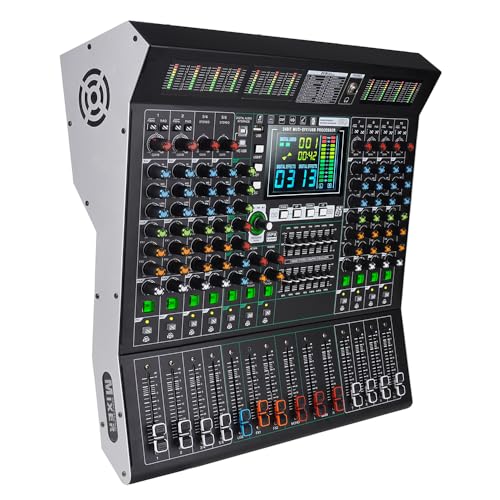
Yamnweo 10-Channel USB Audio Mixer
Best for: Live stage performances requiring 10 channels
- Channels
- 10-Channel (what this guide is about)
- Connectivity
- USB
- Features
- Effects
- Intended Use
- Professionals, Live Performances
- Dimensions
- 16.1 × 16 × 5.5 inches
- Weight
- 15.2 pounds
View on Amazon: Yamnweo 10-Channel USB Audio Mixer Affiliate link
The Yamnweo MD-10 is a 10-channel mixer designed for professional stage use. It features independent 3-band equalization per input and 99 built-in DSP effects. You get USB lossless audio playback and Bluetooth wireless connectivity. The unit includes 48V phantom power and a large LED display for monitoring. It weighs 15.2 pounds and measures 16 by 16.1 inches. This device suits live performances requiring extensive channel control.
Pros
- 10 independent channels with 3-band EQ
- 99 professional DSP effects
- USB lossless audio playback
- Bluetooth wireless connection
- 48V phantom power support
Cons
- Heavy at 15.2 pounds
- Large footprint at 16 inches wide
- No mention of DJ software integration
Good fit if
- You need 10 independent channels for live events
- You require built-in DSP effects for mixing
- You want USB and Bluetooth connectivity options
Skip if
- You prefer a lightweight portable unit
- You need a standard 2-channel DJ controller
- You rely on dedicated DJ software control
Verdict: The Yamnweo MD-10 10-Channel Stage Mixer fits live performers needing extensive channel count and effects without a computer. It is not suitable for traditional club DJing setups.

Pioneer DJ DDJ-FLX4 White 2-Channel Controller
Best for: beginners using 2-deck setups
- Channels
- 2-Channel (what this guide is about)
- Deck Control
- 2-deck
- Performance Pads
- 16 pads
- Audio Interface
- Built-in sound card
- Features
- Performance Pads
- Included Accessories
- Microphone
View on Amazon: Pioneer DJ DDJ-FLX4 White 2-Channel Controller Affiliate link
The Pioneer DJ DDJ-FLX4 is a 2-channel, 2-deck controller designed for beginners. It features 16 performance pads and a built-in sound card. The Smart Fader adjusts volume, bass, and BPM automatically. This layout simplifies mixing for those new to DJing. It connects via USB or Bluetooth to various devices. The unit is compact, measuring 19 by 10.7 inches.
Pros
- 2-channel, 2-deck control for standard mixing setups
- 16 performance pads for Hot Cues and Pad FX
- Smart Fader auto-adjusts BPM, bass, and volume
- Built-in sound card for direct speaker connection
Cons
- Limited to 2 channels and 2 decks
- No dedicated display screen for track info
- Heavy at 6.17 pounds for portability
Good fit if
- You are a beginner learning basic mixing techniques
- You want a simple layout with automatic beatmatching
- You need a controller with built-in audio interface
Skip if
- You require 4 or more channels for complex mixing
- You need multiple deck controls simultaneously
- You prefer a lightweight, highly portable unit
Verdict: Pioneer DJ DDJ-FLX4 2-Channel Controller suits beginners who want a straightforward 2-deck setup with automatic beatmatching. It is ideal for those prioritizing ease of use over advanced multi-channel capabilities.
Specifications side by side
| Spec | Pioneer DJ 2-Channel Controller with 16 Pads | Pioneer DJ 4-Channel Controller with On-Jog Displays | K-mxerpro 8-Channel Mixer with USB Interface | TKLBLS 6-Channel Mixer with 99 DSP Effects | Yamnweo 10-Channel USB Audio Mixer | Pioneer DJ DDJ-FLX4 White 2-Channel Controller |
|---|---|---|---|---|---|---|
| Channels | 2-channel | 4-channel | 8 Channel | not stated | 10-Channel | 2-channel |
| Compatible Software | not stated | rekordbox, Serato DJ Pro | not stated | not stated | not stated | not stated |
| Deck Control | 2-deck | not stated | not stated | not stated | not stated | 2-deck |
| Performance Pads | 16 Performance Pads | not stated | not stated | not stated | not stated | 16 pads |
| Jog Wheels | not stated | Large jog wheels with on-jog displays | not stated | not stated | not stated | not stated |
| Audio Interface | Built-in sound card | not stated | USB Audio Interface | not stated | not stated | Built-in sound card |
| Connectivity | not stated | not stated | USB Audio Interface, USB | not stated | USB | not stated |
| Features | Performance Pads | not stated | 48V Phantom Power | Effects, MP3 Player, 48V Phantom Power | Effects | Performance Pads |
| Intended Use | Streaming | not stated | Karaoke, Professionals, Recording, Streaming | Professionals, Live Performances, Recording | Professionals, Live Performances | not stated |
| Included Accessories | Microphone | not stated | not stated | not stated | not stated | Microphone |
| Dimensions | 10.7 × 19 × 2.33 inches | 15.8 × 28.2 × 2.9 inches | not stated | 9.45 × 10.6 × 2.96 inches | 16.1 × 16 × 5.5 inches | 10.7 × 19 × 2.33 inches |
| Weight | 6.17 pounds | 14.8 pounds | not stated | 4.52 pounds | 15.2 pounds | 6.17 pounds |
| Color | Graphite | not stated | not stated | not stated | not stated | White |
| Model | DDJ-FLX4 | DDJ-FLX10 | 8 Channel Audio Mixer | 6 Channel Audio Mixer | MD-10 | DDJ-FLX4-W |
Frequently asked questions
Can a 2-channel controller handle live vocal effects?
Yes, models like the Pioneer DJ DDJ-FLX4 include performance pads for triggering samples and effects. This allows you to layer vocal chops or sound effects over the two main decks. You do not need extra channels to access these creative tools during a set.
What is the physical size difference between 2 and 4 channel units?
The Pioneer DJ DDJ-FLX4 measures 19 inches wide, while the DDJ-FLX10 is significantly larger at 28.2 inches. The 4-channel unit also weighs nearly double, at 14.8 pounds compared to 6.17 pounds. You need more desk space and a sturdier stand for the larger model.
Do 6 or 8 channel mixers work for traditional DJing?
Devices like the K-mxerpro 8-Channel and TKLBLS 6-Channel are designed for podcasting, streaming, and live performances. They lack the dedicated deck controls and software integration typical of club DJ controllers. You should choose a dedicated DJ controller if your primary goal is mixing music tracks.
Is phantom power important for DJ controllers?
Phantom power is a feature found in audio mixers like the K-mxerpro and TKLBLS models, not standard DJ controllers. It provides 48V power to condenser microphones. If you only mix music, you do not need this feature. It is essential only if you plan to use studio-quality mics.
Can I use a 10-channel mixer for club gigs?
The Yamnweo MD-10 is built for live stage performances and does not support traditional club DJing workflows. It lacks the specific deck controls and software connectivity required for standard DJ sets. You should stick to 2 or 4-channel DJ controllers for club environments.
Does color affect the performance of a DJ controller?
No, the Pioneer DJ DDJ-FLX4 is available in Graphite and White. Both versions share identical specifications, including the 2-channel layout and performance pad features. The color choice is purely aesthetic and does not impact sound quality, connectivity, or the mixing experience you receive.